 Lanes
LanesNever refuses an edit
If Lanes cannot coordinate, the edit still goes ahead and is committed. An agent is queued, never refused, and never told about Lanes, so you never re-send a prompt because of it.
>_ Coordination layer for coding agents
Lanes shows what every teammate's coding agent is doing and queues edits to the same file instead of letting them overwrite each other. It never refuses an edit.

Set up Lanes in this repository by running these terminal commands in order. Stop and tell me if one fails (for example if `code` is not found). 1. code --install-extension MicheleFMatozza.lanes 2. Find the file lanes.cjs that the extension installed: <extensions folder>/michelefmatozza.lanes-*/dist/lanes.cjs. The extensions folder is the one in the VSCODE_EXTENSIONS environment variable if it is set, else ~/.vscode/extensions (another editor keeps its extensions in its own folder). 3. From the root of this repository run: node <path of that lanes.cjs> init Do not run git push yourself (init publishes its own branch lanes/main to origin: that is expected). When done, tell me what was installed and committed, then tell me to reload the editor window (Command Palette: Developer: Reload Window) and to run git push when I am ready.
Paste into Claude Code, in the folder of your repository. It needs Node.js and git on your PATH.01 / The collision
Every tool today is single-player: nobody sees what the other agents are doing until a pull request appears. Watch the same two edits, with and without Lanes.
02 / How it works
Lanes sits between your teammates' agents and coordinates them in the background.
Before each edit an agent takes a short lease on the file. If a teammate's agent holds it, yours waits a moment in a fair queue.
When the lease frees, your agent picks up the latest content silently and goes ahead. It is never refused and never told about Lanes.
Edits are published to a shared branch and merged by git. Lanes adds order, not a new storage system.
03 / The product
The Lanes extension adds one view to VS Code. Teammates only install the extension.
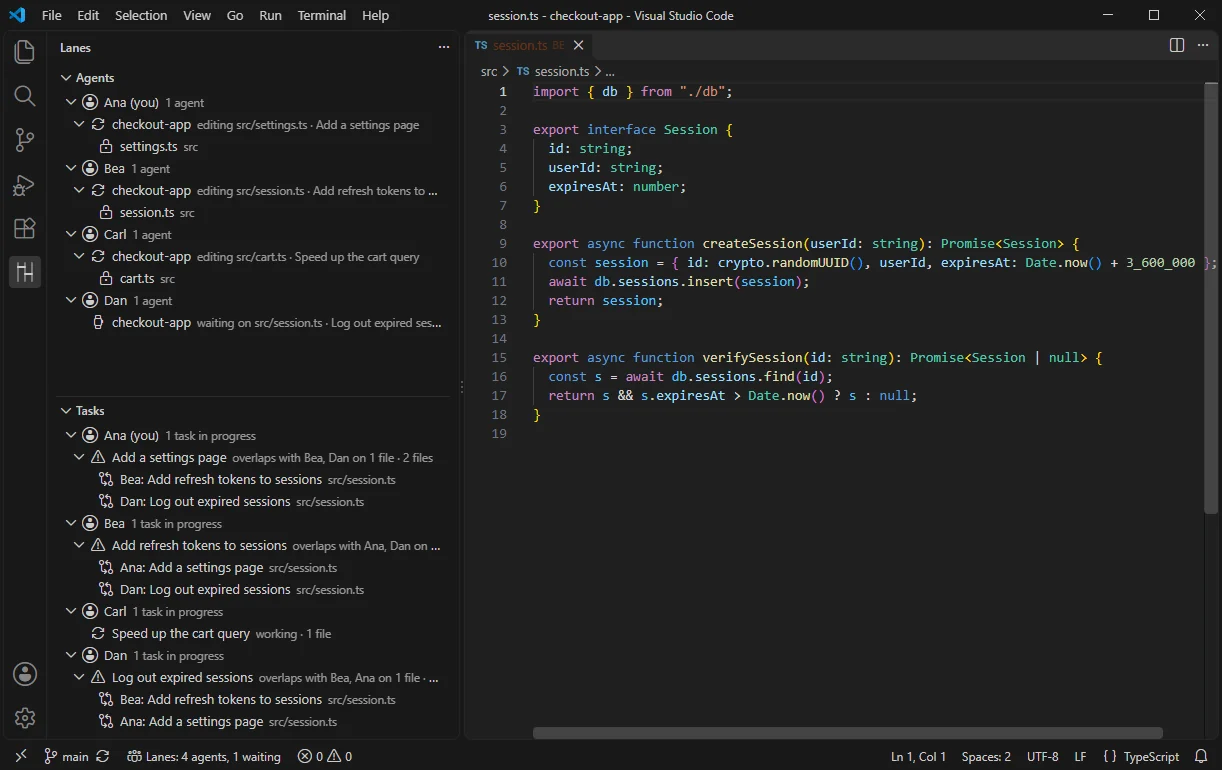
Agents list. Who is working on what, right now, across the team.
Status bar. The whole team at a glance: how many agents, how many waiting.
Explorer badge. Whose agent is editing each file, as initials next to it.
Overlap flag. Two tasks touching the same file are flagged before the agents collide. Nothing is blocked.
Real screenshots of Lanes 0.1.0 with demo teammates and a demo repository.
04 / Built to stay out of your way
If Lanes cannot coordinate, the edit still goes ahead and is committed. An agent is queued, never refused, and never told about Lanes, so you never re-send a prompt because of it.
Source travels through the git remote you already use, and git stays the source of truth. The Lanes server only receives repository identifiers, file paths, names and statuses. No telemetry.
The check before each edit takes under 100 ms when the file is free (p95 74 ms measured on Windows). When a teammate's agent holds the file, the wait is typically about a second.
Claude Code today. Lanes coordinates your tools; it does not replace them or your subscription. Codex and Gemini are planned.
The Community edition runs on a teammate's machine or your own server, with no account. In VS Code, run this and paste the line it copies into a terminal on that machine (Node.js required).
Lanes: Copy Team Server Command05 / Install
Requires VS Code 1.95 or later, git and Node.js on your PATH, and Claude Code for the agents themselves. The folder you open must be a git repository.
Beta teams receive the extension file (lanes-0.1.0.vsix) by email. Install it from a terminal. In Cursor and Windsurf use Extensions, "...", Install from VSIX.
code --install-extension lanes-0.1.0.vsixInstall it from the Extensions view (search "Lanes") or from a terminal. Cursor and Windsurf use their own extension store, which needs a separate Open VSX listing that does not exist yet; until then install the file with Install from VSIX.
code --install-extension MicheleFMatozza.lanesOpen the repository in VS Code and run this in the Command Palette. It adds the hook and commits it. Working alone, there is nothing else to start: the first Claude Code session starts the local server. Or paste the setup prompt from the top of this page into Claude Code: it runs node <path>/lanes.cjs init for you.
Lanes: Set Up RepositoryTeammates install the extension and pull. Start Claude Code in the repository and its agent shows up in the Lanes view within a second.
git pushWorking with a team? One person runs Lanes: Copy Team Server Command and pastes the line in a terminal on one machine (Node.js required), then Lanes: Copy Teammate Join Message and sends it to the team. Everyone else runs Lanes: Join Team Server and pastes the address and token. Your edits always go ahead, whatever state Lanes is in.
Rule: planned means not built
Lanes is file-level today and Claude Code is the only agent so far. We list what is planned so you can judge the roadmap, not so you can rely on it.
06 / Pricing
Paid plans start after the private beta, and beta teams get everything free. Prices per user per month, in US dollars, excluding any applicable taxes. Features marked Planned are not built yet.
Self-hosted, unlimited seats. Available now.
$11.89 billed annually. From 3 seats. Planned price, not yet on sale.
$24.89 billed annually. From 10 seats. Planned price, not yet on sale.
Typically 50+ seats. Planned.
Prices and planned features may change before general availability. Today only Community exists; Team, Business and Enterprise describe what we intend to sell once built. Interested in a plan? Team, Business or Enterprise: an optional email, nothing is tracked and nothing is sold yet.
Want the hosted server when it exists? Request the hosted server. This is a waitlist, not a purchase: nothing is charged and nothing is promised.
07 / FAQ
Not publicly. Lanes is in private beta with small teams, and the Marketplace listing is not published yet. Use the button below to ask for access.
No. When a teammate's agent holds a file, yours waits in a queue, usually under a second, and then continues. If anything goes wrong, the edit goes ahead and is committed so nothing is lost.
No. The coordination server receives repository identifiers, file paths, display names, session IDs and statuses. File contents and prompts are never sent. Edits are shared through the git remote you already use.
Claude Code in VS Code. Cursor and Windsurf can install the extension from the .vsix file (Extensions, "...", Install from VSIX); we have not tested that path yet. More agents are planned.
Your edits go ahead and are committed, so nothing is lost. The hook starts a local server itself when a Claude Code session begins; if none can be reached the status bar shows "Lanes: offline", and Lanes: Start Local Server starts one by hand. If a team server is down, edits go ahead uncoordinated until it is back.
You may not, and that is fine: small teams on one network can run Community indefinitely. Teams pay for what self-hosting does not give: a shared server that is always on and does not depend on a teammate's laptop or on VPN and token set-up, fewer edits that go ahead uncoordinated because the server was down, reach for teammates on different networks, and later history, analytics and admin features. The hosted server and those features are planned and not built yet, which is why paid plans start only after the beta.
In your repository run node <extensions folder>/michelefmatozza.lanes-*/dist/lanes.cjs off, then git push so teammates get the removal. It removes the Lanes hooks and the .lanes/*.cjs files and commits only that; your own hooks and settings stay. Then uninstall the extension from the Extensions view (in that order: the command lives inside the extension). Sessions that are already open keep their hooks until restarted. Your edits are never blocked either way.
Not for the Community edition. Hosted plans will use accounts.
Partly: Lanes is open core. The hook, the VS Code extension, the protocol specification and the shared library are meant to be open source under Apache-2.0. The coordination server is source-available, not open source: you can read it, run it and self-host it for free, but you cannot sell it as a competing hosted service. The hosted service and the paid features are closed. The Community edition is free to use and self-host. The licences are being finalised and the code is not public yet; see the terms.
We are onboarding small teams of 3 to 10 engineers who run coding agents every day. Tell us about your team. Beta teams get everything free.
We will use your email only to reply to this request. See the privacy policy.